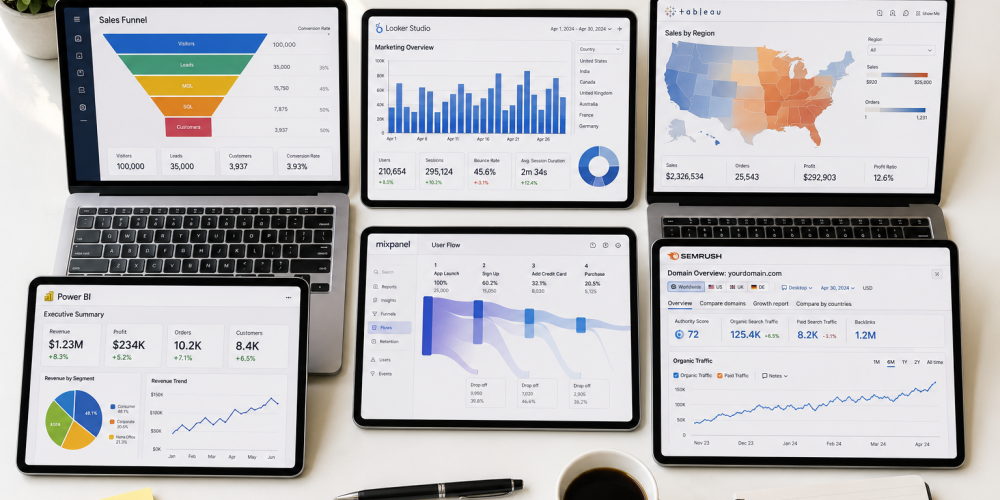
Everyone Talks About Excel and Power BI. Nobody Talks About Business Analytics Tools.
You have heard the usual advice. Learn Excel. Learn Power BI. Learn Tableau. And yes, those tools matter. But here is what nobody tells you when you are starting out in business analytics tools that actually drive decisions inside top companies go much deeper than the ones covered in most beginner guides.
If you want to work at a company that takes data seriously, you need to know what their analysts are actually using every single day. This blog pulls back the curtain on six business analytics tools that are widely used inside leading companies but rarely talked about in course brochures or YouTube tutorials.
[Look at this – Business Analytics course is Hard or Easy to Learn]
Why Knowing the Right Tools Gives You a Real Career Edge
Here is the honest reality of the job market in 2026. Two candidates walk into an interview for a business analyst role. Both know Excel and Power BI. One of them also knows Alteryx, Mixpanel, and Looker. Which one gets the offer?
The answer is obvious. Tool knowledge signals readiness. It tells a hiring manager that you understand how real business analytics workflows operate, not just how textbook exercises work.
Business analytics is not just about crunching numbers. It is about making data flow smoothly from raw input to boardroom decision. The tools in this list are what make that happen at scale inside companies you already know and respect.
Tool 1: Alteryx for Automated Data Preparation
What It Is
Alteryx is a self-service data analytics platform that allows analysts to automate the process of cleaning, blending, and preparing data without writing extensive code. Think of it as a drag-and-drop workflow builder for data pipelines.
Why Companies Use It Daily
Data preparation is the most time-consuming part of any analyst’s job. Alteryx reduces what used to take hours of manual work in Excel or Python into a repeatable, automated workflow that runs in minutes.
Top companies in finance, retail, and supply chain use Alteryx to:
- Blend data from multiple sources like CRM systems, databases, and spreadsheets
- Automate recurring reports so analysts focus on insights, not data wrangling
- Run predictive analytics without needing a data science team to write code
- Share reusable workflows across teams for consistency
Real example: A logistics company reduced its weekly performance reporting process from 6 hours to 40 minutes after implementing Alteryx workflows. The analyst who built that workflow became indispensable overnight.
If you are looking for an Affordable Business Analytics Course in Coimbatore that includes automation tools, check whether Alteryx or similar workflow automation platforms are part of the curriculum.
Tool 2: Looker for Real-Time Business Intelligence
What It Is
Looker is a modern business intelligence and data exploration platform owned by Google. It connects directly to your company’s database and lets teams explore data in real time through interactive dashboards and reports.
Why Companies Use It Daily
Unlike traditional BI tools that require analysts to export data and build reports manually, Looker allows business teams to self-serve their own data questions. The analytics team sets up the logic once, and every department can explore data on their own.
Companies use Looker to:
- Give sales, marketing, and operations teams live access to their own KPIs
- Track product usage, revenue trends, and customer behavior in real time
- Build a single source of truth for company-wide data
- Reduce the number of ad-hoc data requests that land on the analytics team
Real example: A SaaS company’s marketing team used Looker to identify that a specific customer segment had a 3x higher conversion rate than others. That insight, pulled without a single request to the data team, directly shaped their next campaign strategy.
Looker is widely used in tech companies and is a strong tool to mention in interviews for business analytics roles at product-led organizations.
Tool 3: Mixpanel for Product and User Behavior Analytics
What It Is
Mixpanel is a product analytics tool that tracks how users interact with a website or mobile application. It answers questions like: Where are users dropping off? Which features are getting the most engagement? What actions lead to a purchase?
Why Companies Use It Daily
In 2026, almost every company has a digital product, whether that is an app, a website, or an online service. Understanding how users behave inside that product is critical for making decisions about design, features, and growth.
Business analysts at product companies use Mixpanel to:
- Track user journeys from first visit to conversion or churn
- Run A/B test analyses to compare which version of a feature performs better
- Identify friction points where users abandon a flow
- Segment users by behavior and build targeted retention strategies
Real example: A fintech startup in Bangalore used Mixpanel to discover that 60 percent of users who dropped off during onboarding were doing so at a specific verification step. Fixing that one step increased their activation rate by 22 percent in one month.
This is what business analytics looks like in practice inside a product company. And this is exactly the kind of tool knowledge that impresses interviewers who work in digital-first businesses.
Tool 4: dbt (Data Build Tool) for Analytics Engineering
What It Is
dbt, which stands for Data Build Tool, is a command-line tool that allows analysts to transform raw data inside their data warehouse using SQL. It sits between your raw data and your dashboards, making sure the data your teams use is clean, consistent, and reliable.
Why Companies Use It Daily
As companies collect more data from more sources, keeping that data organized and trustworthy becomes a serious challenge. dbt solves this by letting analysts write SQL-based transformations that are version-controlled, tested, and documented.
Companies use dbt to:
- Transform and clean raw data directly inside cloud data warehouses like BigQuery or Snowflake
- Build reusable data models that every dashboard and report can rely on
- Catch data quality issues before they reach business teams
- Document data definitions so everyone in the company is working from the same understanding
Real example: A retail chain with data coming in from 200 stores, an e-commerce platform, and three third-party logistics providers used dbt to create a single unified dataset. For the first time, their leadership team had one accurate number for total daily revenue across all channels.
dbt is increasingly appearing in job descriptions for senior business analyst and analytics engineer roles. Even a basic familiarity with it signals that you understand modern data infrastructure, which sets you apart from most candidates.
Tool 5: Amplitude for Growth and Retention Analytics
What It Is
Amplitude is a digital analytics platform similar to Mixpanel but with a stronger focus on growth analytics and product experimentation. It helps companies understand which user behaviors predict long-term retention and revenue.
Why Companies Use It Daily
Acquiring customers is expensive. Retaining them is where profitability comes from. Amplitude helps business analysts identify the exact behaviors that separate users who stay from users who leave.
Growth teams and business analysts use Amplitude to:
- Identify the “aha moment” when a user first finds real value in a product
- Measure the impact of new features on long-term retention
- Build cohort analyses to compare how different user groups behave over time
- Track revenue metrics like LTV, ARPU, and churn across customer segments
Real example: A subscription-based learning platform used Amplitude to discover that users who completed any three lessons within their first week had a 70 percent higher 90-day retention rate. That insight drove an entire onboarding redesign that significantly improved their renewal numbers.
If you are interested in growth analytics or product roles, Amplitude is a tool worth exploring as part of your business analytics skill set.
Tool 6: Snowflake for Cloud Data Warehousing
What It Is
Snowflake is a cloud-based data warehousing platform that stores and organizes large volumes of data so it can be queried and analyzed efficiently. It is where companies store all their data before it gets pulled into dashboards, models, or reports.
Why Companies Use It Daily
Modern companies generate enormous amounts of data from dozens of sources. Storing all of that in spreadsheets or traditional databases simply does not work at scale. Snowflake provides a centralized, high-performance storage layer that connects to almost every analytics tool on this list.
Business analysts use Snowflake to:
- Query large datasets using standard SQL without performance issues
- Connect data from marketing, sales, operations, and finance into one place
- Collaborate with data engineers and scientists on shared datasets
- Run analyses on billions of rows of data in seconds
Real example: A manufacturing company in Tamil Nadu migrated from a traditional on-premise database to Snowflake and immediately reduced their monthly reporting cycle from two weeks to two days. Their analyst team went from data wrangling to actual analysis almost overnight.
Understanding Snowflake at even a basic level tells employers that you are comfortable operating in a modern data environment, which is exactly where the industry is in 2026.
How These Tools Connect in a Real Business Analytics Workflow
Here is how these six tools often work together inside a real company:
Raw data from various sources feeds into Snowflake for storage. dbt transforms and cleans that data into reliable models. Looker or Power BI connects to those models to build dashboards for business teams. Alteryx automates recurring data preparation tasks. Mixpanel and Amplitude track product and user behavior separately, feeding insights back into the same Snowflake environment.
That is a complete, modern business analytics stack. And understanding how these pieces fit together is what separates a junior analyst from someone who looks and thinks like a senior one.
Should You Learn All Six Right Now?
No. That would be overwhelming and unnecessary at the start of your journey.
Here is a practical approach:
- Start with your core tools first: Excel, SQL, Power BI or Tableau
- Add one tool from this list based on the industry you want to work in
- If you want a product or tech role, prioritize Mixpanel or Amplitude
- If you want a corporate or enterprise role, explore Alteryx or Looker
- If you want to work in data infrastructure or analytics engineering, look at dbt and Snowflake
Found the 6 Business Analytics Tools
The Best Business Analyst Courses in Coimbatore will teach you the core tools and give you a strong enough foundation to pick up these advanced tools quickly on the job or through self-study.
Most students finish a course knowing the popular tools. A smaller group goes further, explores the tools companies actually use daily, and builds a narrative around that knowledge in their interviews.
That second group gets hired faster, starts at higher salaries, and grows more quickly in their careers. You now know what those tools are. The next step is building the foundation that lets you learn and use them effectively.
Join the Venster School of Excellence today. Our Business Analytics Course with Placement Assistance in Coimbatore is designed to take you from foundational skills to industry-ready confidence, with real projects, expert mentors, and active placement support.
Because knowing what the industry uses is only valuable if you have the skills to back it up. Let us help you build both.