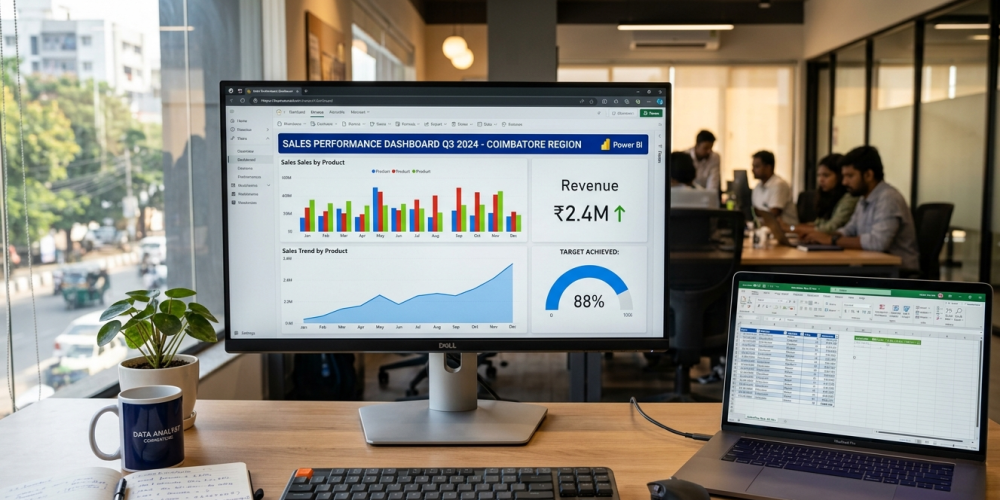
In the modern business world, data is the new oil. But just like oil, raw data isn’t useful until it is refined into something we can use. Today, I am going to teach you a skill that is highly sought after by top companies: building a real-time sales dashboard. Think of this as your “digital command center” where you can see every sale as it happens, without manually updating spreadsheets every hour.
If you are a student or a working professional in Tamil Nadu looking to upgrade your career, finding a Data Analyst is a smart first step. But before you dive into a full program, let’s walk through the actual “how-to” of building a professional dashboard, just like we would in a classroom at the Best Institute For Data Analyst Course.
Phase 1: Understanding the “Real-Time” Concept
Before we open any software, we must understand what “real-time” means in a business context. Most companies struggle because their data is “stale” meaning they are looking at yesterday’s sales to make today’s decisions. A real-time dashboard connects directly to the source of the data.
Imagine a student walks into the Venster School branch in Coimbatore to enroll in a Data Analytics Training. The moment their details are saved, the manager at the Gandhipuram headquarters sees the update on their executive dashboard.
Phase 2: Preparing Your Data Kitchen (Microsoft Excel)
Excel is the most popular data entry tool in the world. To build a dashboard, your Excel data must be “clean.” Imagine trying to cook a meal in a messy kitchen; it takes twice as long. Data cleaning is the most important skill you learn at the Best Institute For Data Analyst Course In Gandhipuram.
1. The Power of “Official” Tables
Most people just type data into cells. For a dashboard, you must convert your data into an Excel Table.
- Select your data range (Date, Product, Price, Units Sold).
- Press Ctrl + T.
- Give your table a name like “SalesData.”
Why do we do this? When you add a new sale on row 101 tomorrow, the “Table” automatically expands to include it. Power BI will then see this new row automatically. This is a fundamental lesson in any Data Analytics Course In Coimbatore.
2. Using OneDrive for “Live” Connectivity
If you save your Excel file on your computer’s “C: Drive,” Power BI cannot talk to it easily. To make it real-time, save your file to OneDrive or SharePoint. This creates a web link that Power BI can “watch” 24/7.
Phase 3: Moving to the Workshop (Power BI Desktop)
Now, we open Power BI. This is where the magic happens. Many students look for a Data Analytics Course With Placement specifically to master this tool because it is the industry leader for visualization.
1. Connecting the Data
Instead of clicking “Import Excel,” we are going to use the Web connector.
- Go to your OneDrive, right-click your Excel file, and select “Embed” or “Copy Link.”
- In Power BI, click Get Data > Web.
- Paste the link (and remove the ?web=1 part from the end).
Now, Power BI is “linked” to the cloud version of your Excel sheet.
2. Power Query: The Secret Engine
Once the data is in Power BI, you might notice some errors. Maybe a date is written as text, or a price has a “Rs.” symbol that prevents math.
- Click Transform Data.
- This opens Power Query. Here, you can change data types (e.g., change “Sales” to “Decimal Number”).
- You can also create “Custom Columns” for example, multiplying “Units Sold” by “Unit Price” to get “Total Revenue.”
Learning Power Query is what separates a beginner from a professional. It is a major focus at the Best Institute For Data Analyst Course In Coimbatore.
Phase 4: Building the Visual Experience
Now for the fun part! We are going to build the actual visuals. A good dashboard follows the “Rule of Three”: it should be simple, clear, and actionable.
1. The KPI Cards (High-Level View)
At the very top of your dashboard, place Card visuals.
- One for Total Revenue.
- One for Total Quantity sold.
- One for Average Order Value.
These are the first things a business owner looks at.
2. Trend Analysis (The Timeline)
Use a Line Chart. Drag “Date” to the X-axis and “Sales” to the Y-axis. This shows you if your sales are going up or down over the month. This helps businesses in Coimbatore plan their inventory for peak seasons like Diwali or Pongal.
3. Regional Performance (The Map)
Since you are likely working with local businesses, use the Map Visual. Drag “City” or “Branch Location” to the Location field. Power BI will show bubbles on a map of Tamil Nadu, showing which area is performing the best.
4. Product Comparison (Bar Charts)
Which product is the “Hero”? Use a Clustered Bar Chart to show “Sales by Product Category.” This tells the business which items to stock more of and which to stop selling.
Phase 5: Advanced Logic with DAX
DAX (Data Analysis Expressions) is the formula language of Power BI. It’s like Excel formulas but much more powerful.
- Example: To calculate “Year-to-Date” sales, you would use a DAX formula.
- Companies hiring from a Data Analyst Course With Placement program expect you to know how to write basic DAX to create complex business metrics.
Phase 6: Publishing and Automation
Once your dashboard looks professional, click the Publish button. This sends your report to the Power BI Service (the cloud).
- Set up Scheduled Refresh: In the Power BI online settings, you can tell the system to check your OneDrive Excel file every hour.
- Mobile View: You can even design a “Mobile Layout” so the business owner can check their sales on their phone while having coffee in R.S. Puram.
This level of automation is exactly what is taught in a high-quality Data Analytics Course In Coimbatore. It moves you away from manual “data entry” and into the world of “data strategy.”
Why Students Should Learn This Today
The demand for data-literate professionals is exploding. Whether you are a student in Gandhipuram or a professional working in the textile or pump industry in Coimbatore, these skills make you irreplaceable.
By mastering the bridge between Excel and Power BI, you become the person who provides “insights,” not just “reports.” If you want to dive deeper into these concepts, searching for the Best Institute For Data Analyst Course In Gandhipuram will lead you to mentors who can guide you through real-world projects just like this one.
Summary of Skills Learned:
- Data Structuring: Using Excel Tables for dynamic growth.
- Cloud Integration: Connecting OneDrive to Power BI for live syncing.
- Data Transformation: Using Power Query to clean messy business data.
- Visualization: Designing charts that tell a story for CEOs.
- Automation: Setting up refresh schedules so the data stays “real-time.”
Finding a Data Analytics Course With Placement is not just about the certificate; it’s about building a portfolio of dashboards like this one to show to recruiters.
Building a real-time sales dashboard is a journey from raw numbers to clear business decisions. By following these steps, you move from being a student to a professional contributor. The tools are free to try, and the data is all around us.
If you found our guide to data mastery helpful, feel free to Contact Venster School of Excellence and register for a free demo Session
FAQ
- Can I build this if I only have a basic knowledge of Excel?
Yes! You only need to know how to create a table. Power BI handles the difficult visualization parts. - How do I get my data to update every second?
For “second-by-second” updates, you would use “Streaming Datasets,” but for most businesses, an hourly refresh via OneDrive is perfect. - Is Power BI better than Excel for dashboards?
Yes, because Power BI handles much larger datasets (millions of rows) without slowing down your computer. - Do I need a paid license to start?
The Power BI Desktop version is 100% free for learning and personal use. - What is the “Best Institute For Data Analyst Course In Coimbatore” to learn this?
Look for institutes that offer “hands-on projects” and “live data” training rather than just theory. - Can I connect Power BI to my Tally or ERP software?
Yes! Most modern ERPs allow you to export to Excel or connect directly to Power BI. - What are the job roles I can apply for after learning this?
You can apply for roles like Junior Data Analyst, Business Intelligence (BI) Developer, or Sales Operations Analyst. - Does this course require math or statistics?
Only basic math (addition, percentages, averages). The software handles the complex calculations for you. - How long does it take to master Power BI?
You can build your first dashboard in a day, but mastering DAX and Power Query usually takes 2 to 3 months of practice. - Is there placement support for data analysts in Coimbatore?
Yes, many training centers offer a Data Analytics Course With Placement to help you connect with local tech parks and corporate offices.